
We asked David Michael of Passionate DJ to put together this guide based on his deep-dive reviews of the best standalone DJ systems. We kept our noses out of it. No salesmanship, just 100% honest, expert advice from one of the best reviewers in the game.
Intro
Let’s talk about the Best Standalone DJ Systems in 2026.
While I spend a lot of time reviewing individual pieces of DJ hardware, it’s sometimes important to take a step back and examine the bigger picture. So that’s what we’re doing today, in my Ultimate Guide!
These are different from DJ controllers, as they can operate completely on their own (without the aid of a laptop). Though most of them will work as controllers, too!
The devices are primarily divided into two categories: those powered by rekordbox and those powered by Engine OS. If you have a strong preference one way or another, this may be your first deciding factor.
If you don’t yet have a preference, choose rekordbox if you want familiarity with club standards and prioritize sound quality. Choose Engine OS if you want the best features for your hard-earned dollar.
Further down the guide, we’ll discuss portables. These more affordable options often come with features like onboard batteries or speakers, giving tons of functionality in a small footprint.
Links to complete reviews of most hardware discussed today are provided below.
Best Rekordbox DJ Systems
AlphaTheta XDJ-AZ ($3,199)
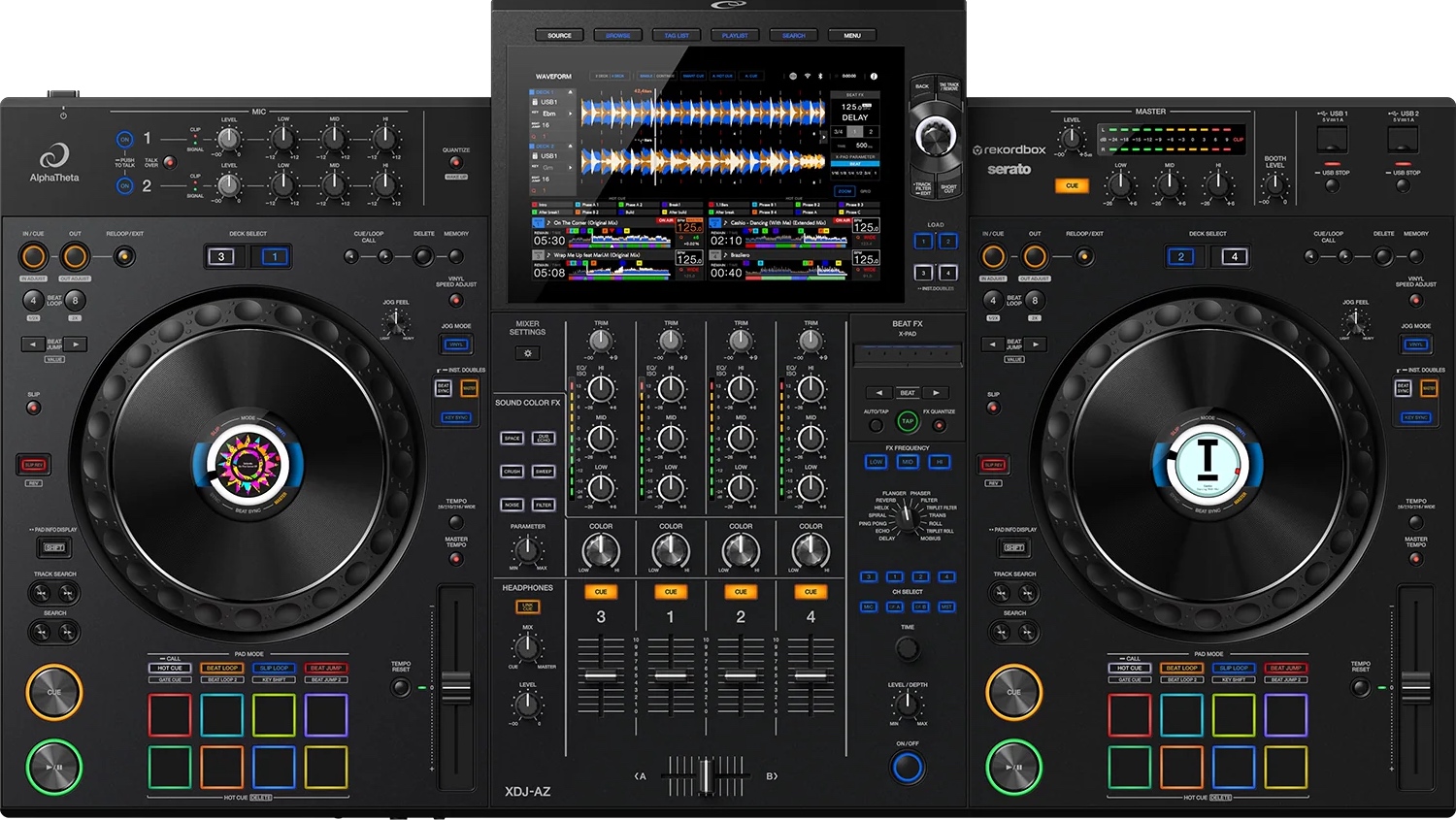
If what you’re looking for is the best alternative to a pair of CDJ-3000s and a DJM mixer, you’ll land squarely on the XDJ-AZ.
The DJ community loves this one, and for good reason. It’s an all-in-one version of the flagship festival setup that we all eventually encounter (or hope to someday).
The AZ is expensive, though at half the price of the full CDJ setup it emulates, it can almost feel like a bargain.
It inherits that pro setup look and feel, including full CDJ-size jog wheels with high-res displays.
Using its built-in Wi-Fi, you can access streaming services such as Apple Music, Beatport, TIDAL, or your own library via CloudDirectPlay. It also unlocks rekordbox performance mode & Serato DJ Pro, if you’d like to use it as a DJ controller with your laptop.
The beautiful 10.1” touch screen is crispy and readable, with a lovely UI that’s easy to use, and has plenty of space for 4-deck control.
If you want to add external sources (like CDJs or turntables), you can do that too. Pro DJ Link is supported, meaning you can add CDJs to the local network and share music across the players.
There’s a built-in SonicLink transmitter that supports AlphaTheta’s own HDJ-F10 low-latency wireless headphones.
As far as sound quality, the XDJ-AZ is absolutely top-notch (the best on today’s list). It supports lossless files, such as WAV/FLAC/ALAC, and incorporates a high-end D/A converter from ESS Technology. You’ll hear crisp and transparent sound that is capable of handling any size venue.
The FX work very much like a DJM-A9 mixer. It carries that full suite of FX, and similar abilities too. You can apply FX to specific frequency bands, adjust the tempo and level/depth settings, and modify them with the touch of your finger using the X-Pad.
The intent of the AZ is to deliver a high-end standalone experience that mimics a high-end club setup. That way, you’ll be mostly familiar with the CDJ workflow when you encounter it.
🎥 Full XDJ-AZ Review
👉 Get Yours Here!
AlphaTheta Opus-Quad ($3,199)
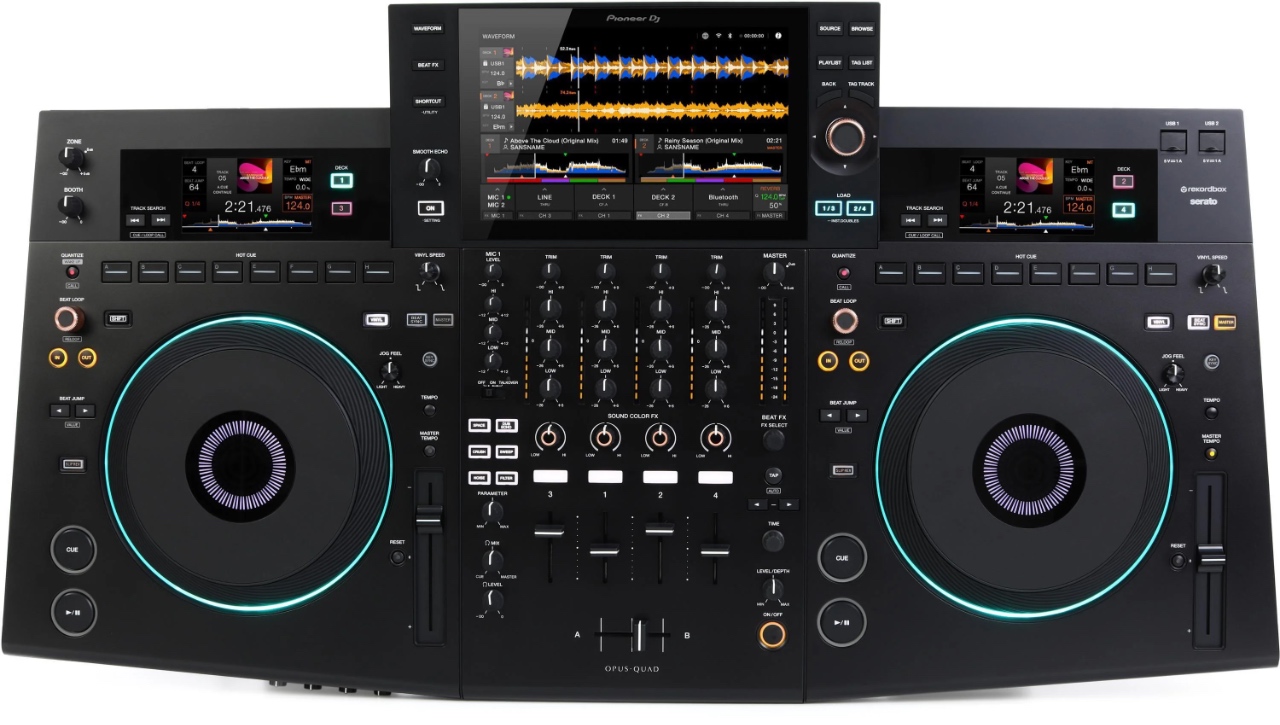
The Opus-Quad is a similar device which supports four-channel standalone mixing with external inputs, a high-quality 10.1” touch screen, and similar audio ports & connections.
Rekordbox performance mode and Serato DJ Pro are unlocked, so you can use it like a controller. It currently supports the same streaming services as the XDJ-AZ, including CloudDirectPlay for remotely accessing your own library.
It has a more unique look, though. Its curved design, orange-and-white color scheme, and faux-wood trim make it a striking visual centerpiece of your DJ booth.
The Opus-Quad adds two deck-specific screens above the jog wheels. These contain most of the information that you’d find in the jog wheel displays on the AZ (track position, album art, etc.) This triple-screen setup gives you a lot of easy-to-read feedback, while still keeping the main waveform action on the big screen.
You’ll also find 8 hot cues above the jog wheels, lined out in a single row, much like a CDJ-3000.
And for browsing, you get the new Smart Rotary Selector. This turns the browse knob into a little joystick that lets you move up/down, left/right, making it easy to navigate large libraries.
Generally speaking, the FX section of the mixer is much simpler. The Opus-Quad relies on the center screen for selecting and configuring FX.
But, this comes with some advantages. Instead of the X-Pad (a small touch-strip found on the AZ and many Pioneer DJ mixers), you get Touch FX. This lets you use the whole giant screen to add and manipulate FX using the swipe of your finger.
Going Mobile
If you’re a mobile DJ, playing weddings or corporate events with multiple rooms, you’ll appreciate the Zone output. This gives you a separate audio track and output to run to the speakers of a different room.
This can be handy, for example, if you want to play classical music in the lobby while having a dance party for the bride and groom in the reception hall.
The Opus-Quad has great sound quality. It, too, can play lossless files – and contains a high-quality D/A converter from ESS Technology, though at slightly lower spec than the AZ. It puts out terrific, punchy sound.
🎥 Full Opus-Quad Review
👉 Get Yours Here!
Pioneer XDJ-RX3 ($2,269)
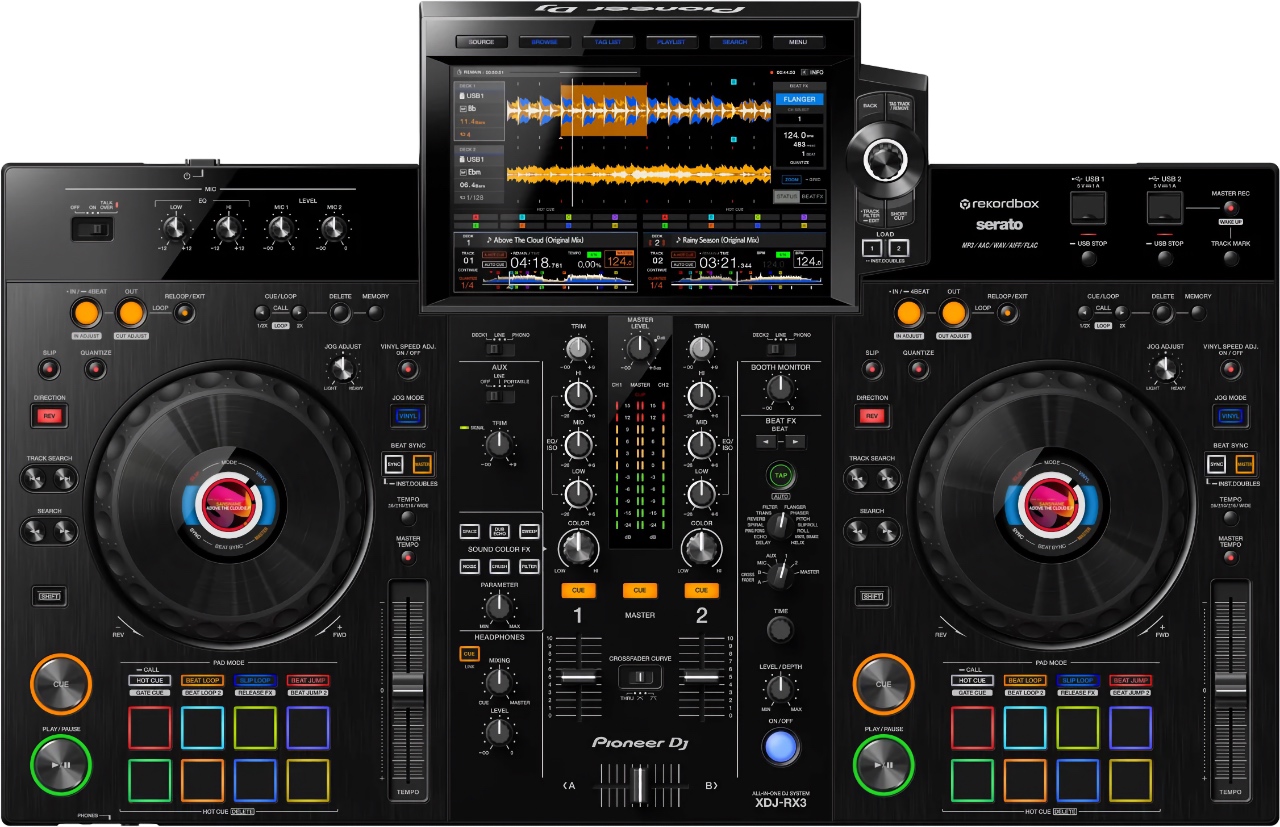
The XDJ-RX3 can now be thought of as a 2-channel alternative to the XDJ-AZ.
You’ll find the same beautiful 10.1” touch screen and on-jog displays found there. Its high-resolution and framerate, and modern UI, give it a truly premium feel.
It inherits the Browse section and 3-band waveforms from the CDJ-3000. The jog wheels are smooth and feel great, though they are smaller than the others mentioned so far (at 6”).
The mixing section is very much like a 2-channel version of a DJM-900NXS2 (which was the flagship mixer when this released). You get access to every one of the 14 Beat FX and 6 Sound Color FX found there.
Or you can use Release FX (which lets you add drama via the beat pads). This provides effects like Vinyl Brake, Backspin, Echo Out, Build Up, Mute, and Duck.
The RX3 is strictly a two-channel affair. However, it still supports external sources.
So if you want to connect a CDJ or turntable, you can do so – you’ll just have to replace one of your standalone channels to use it.
It unlocks Rekordbox Performance Mode and Serato DJ Pro, so you can use it as a DJ controller.
With its three USB ports (one for a laptop), two mic inputs, and ability to expand hardware, the RX3 is clearly meant to allow for use by multiple DJs. Even if only in two channels.
So what’s the catch? Well, the RX3 has no networking capabilities to speak of. No built-in Wi-Fi, no ethernet port, no Pro DJ Link, no streaming music services.
Best Engine OS DJ Systems
Denon DJ PRIME 4+ ($2,199)
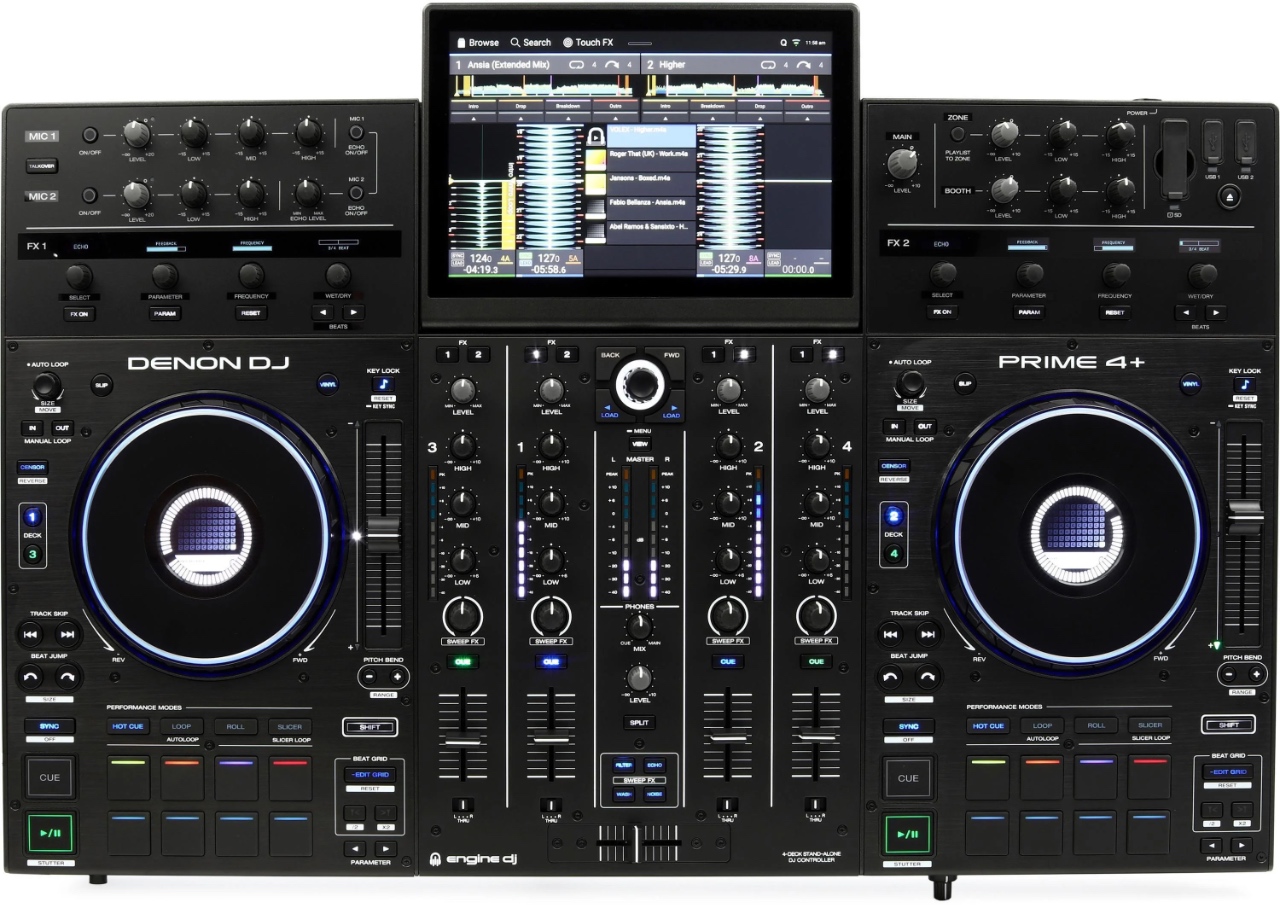
If you want the one device that does it all, it’s pretty easy for me to point you directly to the PRIME 4+ by Denon DJ.
It supports a smattering of streaming music services: Apple Music, Amazon Music, Beatport, SoundCloud, TIDAL. You can also access your personal library via Dropbox. All of this is available thanks to built-in Wi-Fi (or ethernet port).
The endless source options continue. You get four USB inputs, an SD card slot, and a 2.5” SATA drive bay (allowing you to install an internal hard drive). On the back, you’ll find 4 phono/line switchable RCA inputs so you can add external players or turntables.
The 10.1” touch screen (the same size as the high-end AlphaTheta units) looks lovely, with wonderfully readable text and good use of contrast and dark backgrounds.
Unlike everything else on today’s list, the screen can be tilted to your preferred angle. This allows you to make use of its multi-touch gestures comfortably.
The user interface for Engine OS is easy to use, and a bit more consistent across all products, in comparison to rekordbox.
It has 14 built-in FX that are sourced directly from their X1850 club mixer, but uses an old-school controller-style “three knob” approach to adjusting them. You get visual feedback on these FX, thanks to tiny crispy OLED displays.
It also has 4 single-knob Sweep FX (one of them being your filter). These are similar to Color FX knobs on Pioneer gear.
You get two mic inputs, with 2-band EQ and echo control.
And, you get a zone output, making this a great option for mobile DJs. Like the XDJ-AZ, you can send different music to a different room, such as a lobby, or dinner hall.
Stems
The other thing you get is stems control. This allows you to control different parts of the song (vocals, melody, drums, etc.). This is a feature that’s still not offered by any rekordbox standalone (unless using it with a laptop).
You do have to pre-render these stems using the Engine Desktop software. But once that’s done, you can drop or add acapellas, drum tracks, melodies and vocals to your heart’s content.
This feature comes for free with the PRIME 4+. For all other Numark and Denon DJ standalones, you’ll have to purchase a one-time license for $9.99.
Feature-for-feature, it knocks the competition out of the park.
🎥 Full PRIME 4+ Review
👉 Get Yours Here!
SC Live 4 ($1,299)
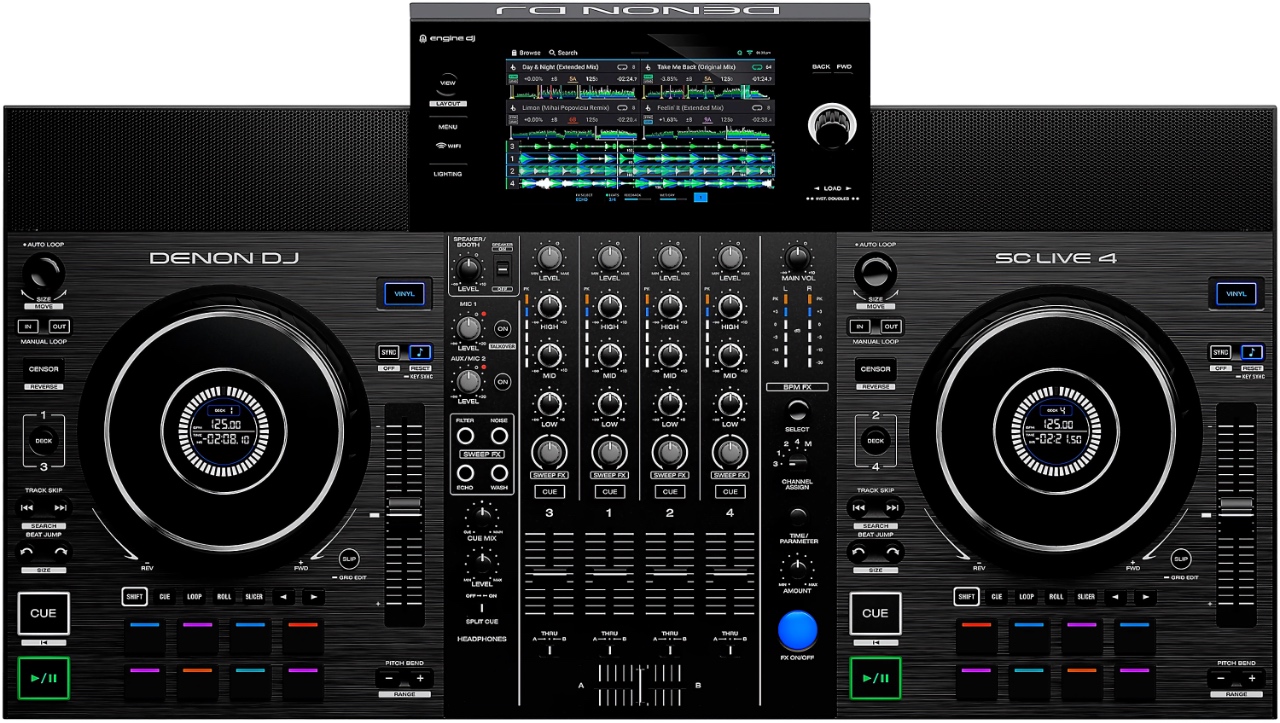
Here’s where you’ll likely find the best bang-for-buck on this entire list.
This is also a four-channel standalone, with 13 customizable FX, the single-knob sweep FX, and nice jog wheels.
It supports all the same streaming and cloud services as the PRIME 4+ (and any other Engine OS device), or you can play via 2 USB inputs or the onboard SD card slot.
But the SC Live 4 brings something extra to the table: onboard speakers. They aren’t enough to rock a whole club, but they sound surprisingly good in a small room.
This can be great for prepping your sets with minimal fuss, or just throwing a little kitchen shindig with your buddies.
Once you pay that one-time $9.99 fee, you’ll be able to use stem separation (though the stems will need to be pre-rendered on a computer).
At $1,299, is nearly half the cost of a PRIME 4+, but it’s important to know its limitations.
Most notably, it’s an entirely in-the-box experience. There are no inputs for turntables or digital players.
Also, while the screen looks nice, it’s much smaller, and fixed in place. And I must say, a 7” screen feels rather cramped when trying to control four decks, vertical waveforms or not.
That said, standalone four-deck control with the huge feature set like this, is a steal at this price. It’s a no-brainer, default option for anyone on a budget who doesn’t need external inputs.
And, it works as a rather decent DJ controller for Serato or Virtual DJ, too.
🎥 Full SC Live 4 Review
👉 Get Yours Here!
RANE System One ($2,499)
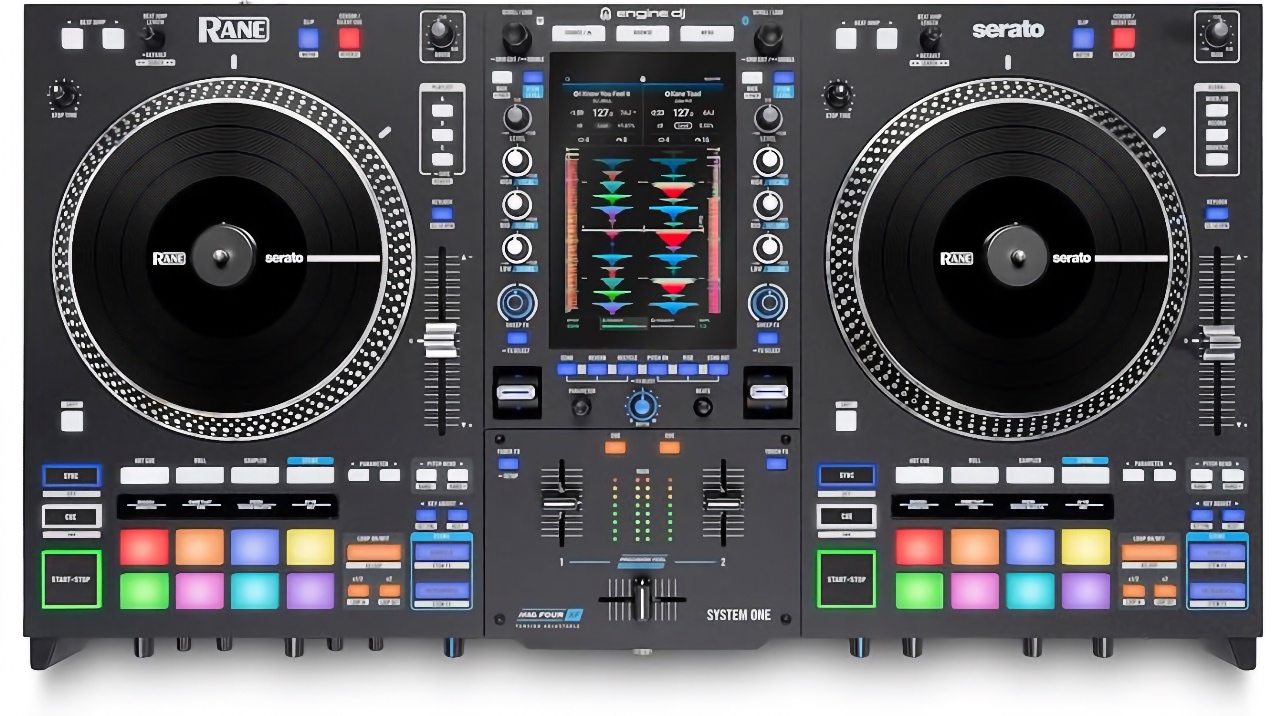
If you’re a scratch DJ, you might want something that spins on its own. For that, you’d be looking at the RANE System One.
This is the world’s first all-in-one standalone DJ system with motorized platters, allowing open format DJs to seamlessly mix between standalone media (like a USB thumb drive), streaming services, and Serato DJ.
This is all thanks to what RANE calls OmniSource technology, meaning no reboot is needed between using it standalone vs. with a laptop.
The heavy, mechanical rotating wheels make all the difference when it comes to scratch routines for DJs used to real turntables. It has plenty of torque, which can be adjusted low/hi, and it uses real slipmats with locking vinyl platters to give an authentic feel.
And since it’s powered by Engine OS, you get all the benefits of anything running on that system. That means built-in Wi-Fi streaming via Apple Music, Amazon Music, Beatport, SoundCloud, TIDAL, or Dropbox — and integrated lighting control.
There’s even a built-in SATA slot on the underside, meaning you can install an internal hard drive (just like the PRIME 4+) and keep an entire massive library on the device itself.
The System One has a TON of onboard FX, too: 25 onboard Main FX, which are activated with high-quality paddles; 5 knob-controlled Sweep FX, 10 Touch FX on the screen, and 4 fader-activated Fader FX. You can also tap into Serato for its software-based FX.
The screen is of high-quality, just like everything else we’ve talked about so far, though it’s vertically-oriented. This is a first for the standalones industry, but actually, it works quite well.
The whole thing feels a lot like a high-end RANE mixer running Serato – but it will run all on its own.
There is also a high-end Mag Four crossfader, which is adjustable for both curve and tension, and high-end performance pads with crispy OLED displays for feedback.
Limitations
This is all high praise, but the System One is not without its limitations. For example, its a two-channel device only. That might be a hard pill to swallow at this price point.
On top of that, you can’t connect external inputs. That means no using real turntables, even though it’s a mixer that otherwise has the chops.
So, those are two points against the device that many DJs are considering an otherwise perfect score. It’s got crazy-good build quality, high-quality components, and oh yeah — stems control.
In fact, the System One gives you this feature for free, just like the PRIME 4+.
🎥 Full System One Review
👉 Get Yours Here!
Help Me Decide!
The XDJ-AZ and Opus Quad are incredibly similar, so this is largely a matter of preference. Most DJs (including myself) prefer the AZ. It’s a little more like a CDJ-3000 setup (even though the Quad is the only one putting the hot cues in the same place).
The Opus Quad is meant to have a unique aesthetic, and provide helpful options for mobile and working DJs.
At full price, I’d push you towards the XDJ-AZ. Especially if you want to expand with CDJs or XDJs.
It has more physical controls (relying less on the screen), and properly supports Pro DJ Link for music sharing across players.
It’s worth keeping an eye on the Opus-Quad because it often goes on sale.
The XDJ-RX3 is a terrific choice if you simply don’t care about four-channel mixing, and don’t need internet access for your DJing.
It will save you a lot of money over an AZ, but still give you a fairly similar experience. And it will sound great doing so, though it doesn’t have quite the same pristine audio output as the AZ.
There is an honorable mention called the XDJ-RR. This is a much simpler 2-channel system, with smaller fixed jog wheels, much less focus on FX, only four hot cue pads on each side, and an older interface based around the CDJ-2000NXS2 era.
If you aren’t already married to rekordbox, but you want the “best” standalone system around (by features), I highly recommend you look at the PRIME 4+. THIS is the piece that shows how standalone DJ hardware should be done.
It does not have the large jog wheels or sound quality chops of the XDJ-AZ & Opus Quad, but it still sounds and feels great. I’ve heard tons of PRIME 4 units in tons of venues at this point, and they’re always on point.
This is the best option for mobile DJs, due to its built-in hard drive capability, superior streaming service integration, and Zone outputs.
My second pick for mobile DJs is the Opus Quad – the only other option with a Zone output.
If you’re sold on Engine OS but don’t need all the features of the PRIME 4+, the SC Live 4 is an impressive alternative. It lacks the big beautiful tilting screen and that’s probably the biggest downgrade. But its onboard speakers are surprisingly nice.
And that brings us to the RANE System One. Obviously this is meant for open format scratch DJs who want the tactile feel of vinyl records.
But you’ll pay for that privilege – both with your wallet, and your back, as the System One weighs nearly 30 lbs. And you’re limited to 2 channels and no external sources.
My advice is to be honest with yourself. If you are actually going to utilize the platters for scratching and cutting, this is a great modern alternative to a full turntables and mixer setup.
But if you’re just looking for the standalone DJ system that can do the most stuff, choose the PRIME 4+ instead.
Best Portable Standalone DJ Systems
Numark Mixstream Pro+ ($699)/Pro Go ($839)
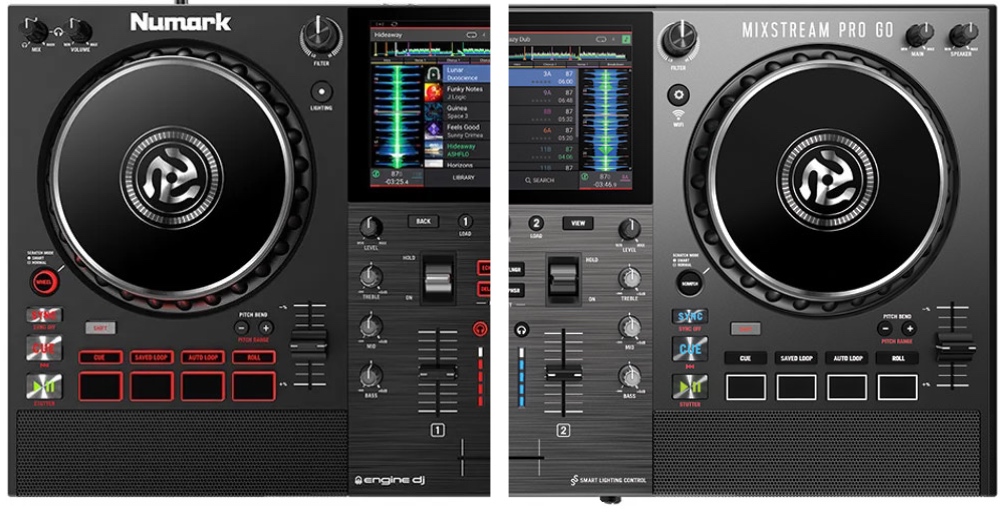
These are very affordable, portable, standalone DJ systems that operate in 2 channels and have built-in speakers.
These speakers are what I’d describe as decent. They sound fine for set prep purposes, practice, or a small hangout with your buddies. These aren’t meant to rock any kind of venue. They also don’t have the same “oomph” as the speakers on the SC Live 4.
But the Mixstream Pro line is an extremely convenient way to DJ, with its large and rather nice jog wheels, a 7” high-res display (which is plenty for 2-channel work), onboard Wi-Fi and wireless lighting control.
The Mixstream Pro+ is extremely affordable at $699. There are plenty of ways to source your tunes, including streaming via Amazon Music, Apple Music, Beatport, Soundcloud, TIDAL, and Dropbox. There are also SD cards and USB ports on the back, for local music access.
The Mixstream Pro Go has all these same features, plus a battery that will last for 4 – 6 hours, for $839. It also has a lovely silver finish.
These units have fairly limited FX (four in total, plus a few Touch FX). But the ones that are here do sound pretty good.
By the way, you also get STEMS control, as you do with all Engine-powered standalone systems. Again, these need to be pre-rendered on your computer, but that’s some fantastic functionality for the price.
👉 Get Your Mixstream Pro+!
👉 Get Your Mixstream Pro Go!
Denon DJ PRIME Go+ ($999)
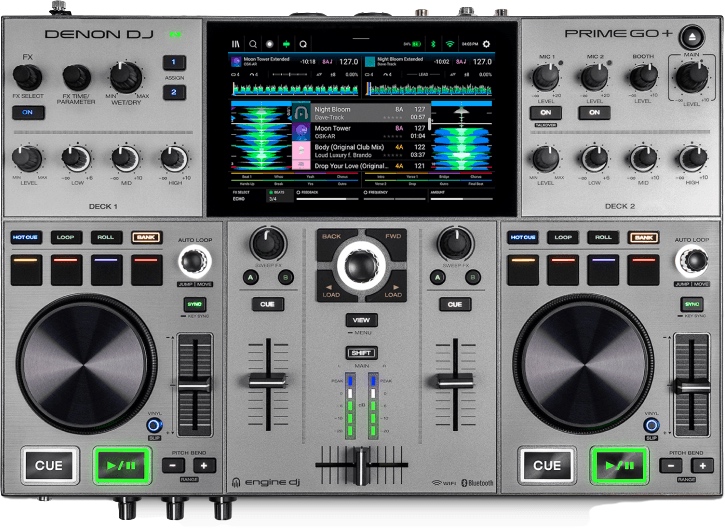
While the Mixstream devices are largely plastic, the PRIME Go+ features a heavier metal chassis which makes it more robust for gigging around.
You’ll find a much wider array of effects here, and better control over their parameters. You get 26 Main FX, 2 “Sweep FX” called “Filter” and “Noise”, and 10 Touch FX on the screen.
You also have physical buttons for performance features like looping and beat jumps.
The PRIME GO+ has a big connectivity advantage. While both units offer XLR and RCA master outs, the PRIME GO+ has a 1/4” booth output, an aux input, and two combo-jack mic inputs. The Mixstreams have only a single 1/4” mic input without dedicated EQ.
So let’s talk downsides. The jog wheels, while they feel nice, are cookie-sized.
The overall layout is weird, with horizontal channel EQs separated from the mixer section, and a much more “crammed-together” situation.
It costs more, at $999. And while you’ll get better, more consistent battery life here – much of that is because it lacks the onboard speakers found on the Mixstreams.
If you’re a mobile DJ with connectivity options, you prioritize FX, or you just need a really rugged and robust device – choose the PRIME GO+. My personal preference is the Numark Mixstream Pro Go, because it has both battery AND speakers, the ergonomics are better, and it’s lighter than the PRIME Go+ despite being larger.
AlphaTheta Omnis-Duo ($1,599)
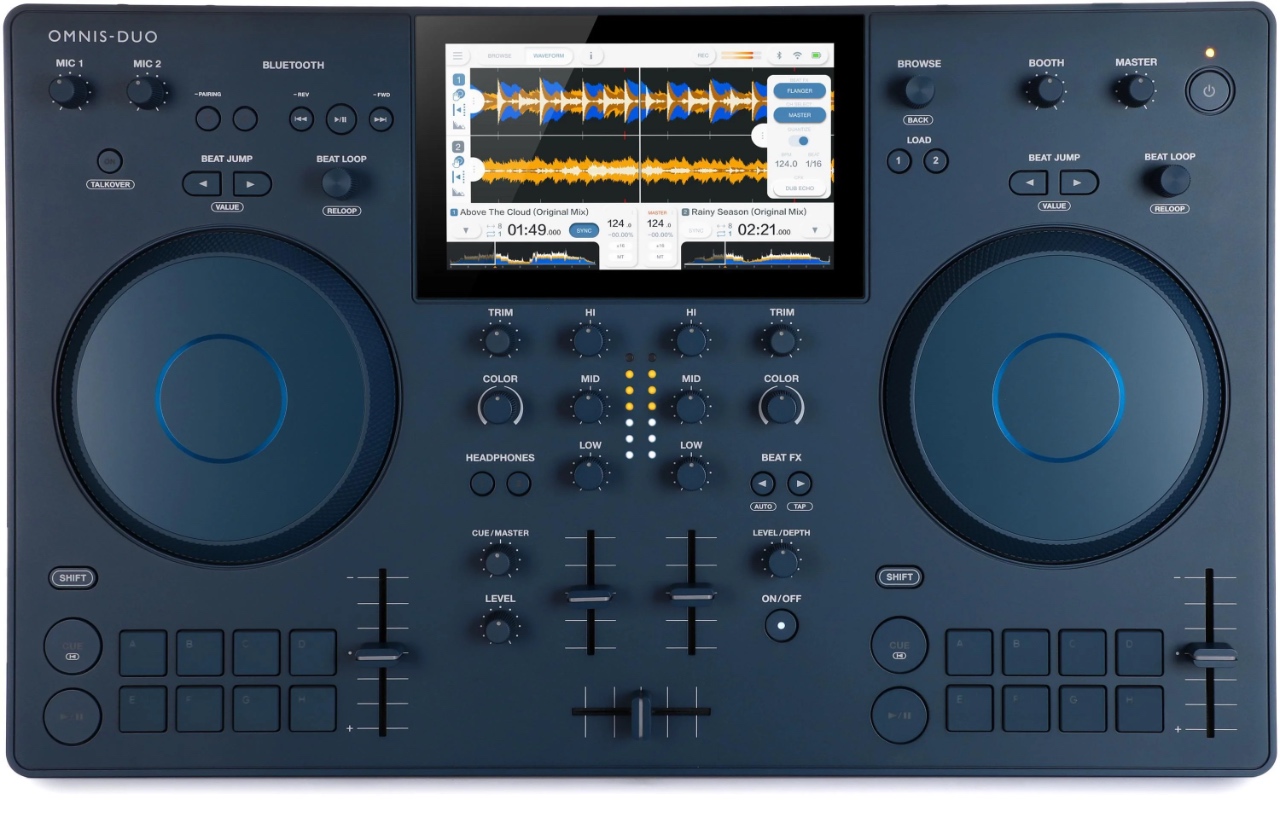
Other than its opinion-splitting Indigo color, the design on display here is the most familiar.
Its modest size and weight (about 10 lbs.) and minimalist design with short, stubby controls makes for easy backpack transport.
You’ll find appropriately-sized jog wheels, a full set of 16 hot cue pads, and everything in its “correct place”.
The Omnis-Duo sources its music from USB-A stick, SD card, from the Cloud, or over streaming services Apple Music, Beatport, and TIDAL. It also works as a controller with Rekordbox performance mode, and Serato DJ Lite.
It has a few unique features, too. You can use the Bluetooth input to record incoming audio – and then play and manipulate that audio just like anything else in your library. Perhaps not very useful out in the club, but really fun to play with at home.
The Omnis-Duo fills a market need for rekordbox-powered hardware in the portable standalones market.
That said, the PRIME Go+ still has better build quality, extensive effects, more physical controls, more streaming services, superior track analysis, lighting control, and stems.
The Mixstream units have all those same features, maybe with comparable build quality, and they now cost HALF of the Omnis-Duo MSRP.
Your Turn
We put a lot of love into these reviews to serve you, our friends, and the global community of DJs.
If you found this useful, please support by:
- Sharing this post on your socials (or texting it to another DJ who’ll benefit).
- Subscribing to the Passionate DJ YouTube channel.
- And if you are looking to pick up recommended gear, consider purchasing from The DJ Hookup. Ask us for the below-advertised pricing and we’ll be happy to hook you up!