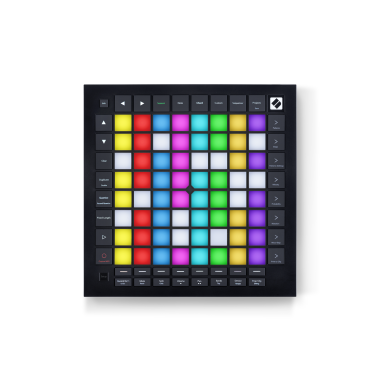
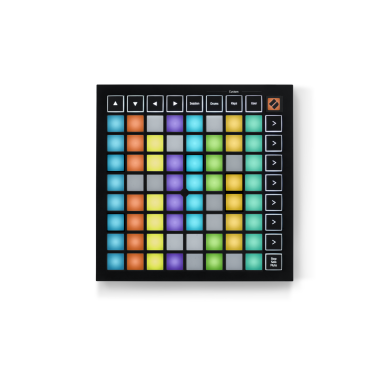
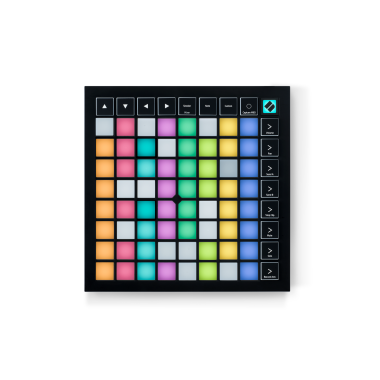
With a multi-colour 64-button grid and dedicated scene launch buttons, Launchpad is purpose built for triggering and manipulating clips in Live, it also offers a totally new way of controlling Ableton Live’s mixer. Launchpad's buttons can be used to sketch out beats with drum racks, and they can be assigned to other functions in Live using Ableton's 'Learn' mode.
Launchpad ships with a dedicated ‘Launchpad edition’ of Ableton Live 8, but can control almost any other music software using Novation's award-winning 'Automap' control software.
KEY FEATURES:
- Designed in partnership with Ableton and Novation - seamless operation
- 64-button lighted grid and dedicated scene launch buttons
- Volume, pans, sends, track arming, solo, and muting functions - for all eight channels at once
- Bi-directional communication between LaunchPad and Ableton LIVE
- Use up to 6 LaunchPads at a time, compatible with Automap and other controllers
- USB bus-powered.
- Class Compliant with Windows XP, Vista, Mac OSX incl. Snow Leopard
INCLUDED SOFTWARE:
- Special version of “Ableton Live 8 Launchpad Edition”
- Ableton LIVE demo project
- 1 Gb Loopmasters loops
- 500Mb of "Mike the Drummer" drum samples
MULTIPLE UNITS:
Go Large!
Connect up to 6 Launchpads at a time. Expand your grid with multiple Launchpads, or have one Launchpad dedicated to mixer mode, and the other to launching clips.
Expand your Ableton control
Novation’s controllers work seamlessly together, a ZeRO SL MkII to control Live's mixer and devices, whilst Launchpad triggers clips! Novation's SL MkII controllers have now been fully integrated into Live by Ableton and Novation's development teams.
Launch clips and scenes
Launchpad’s 64-button grid and dedicated scene launch buttons are ideal for launching and controlling your clips and scenes.
Create your own control surfaces!
Set up user mode to activate or solo channels, play notes and control FX devices, all on one page. So you can create totally personalised ways of improvising with Live.
Innovative control over your mix
Including volume, pans, sends, track arming, soloing and muting. Launchpad lets you jump to different levels across eight channels at once.
Sketch out beats
Launchpad can be used to play drum racks, creating beats and triggering samples in real time.
Controlling other functions
Launchpad can be used to control other functions using Ableton's 'Learn' mode. This includes knobs and faders in Live's instruments and FX, which can be assigned to rows of buttons on Launchpad.
Physical controls and Indicators
• 64 (8x8 grid) square multi-colour back-lit buttons
• 8 round multi-colour back-lit system buttons (assignable)
• 8 round multi-colour back-lit function buttons (not assignable)
Connectivity
• L-shaped USB 1.1 connector.
Minimum Operational Requirements
Macintosh
• OS: 10.4, or later recommended
• Computer: G4 or faster / Intel Mac
• Memory (RAM): 512 MB RAM / 1 GB recommended
Windows
• OS: Windows XP or Vista
• Computer: 1.5 GHz or faster
• Memory (RAM): 512 MB RAM / 1 GB recommended
Dimensions
Unit: W = 240 mm / 9.45 “, H = 20 mm / 0.79 “, D = 240 mm / 9.45 “
Box: W = 308 mm / 12.13 “, H = 90 mm / 20.98 “, D = 320 mm / 12.6 “
Weights
unit weight: 717gms /unit
boxed weight: 1kg/unit
Tutorial
<object width="640" height="390"><param name="movie" value="http://www.youtube.com/v/3aX-7jmYJJU&hl=en_US&feature=player_embedded&version=3"></param><param name="allowFullScreen" value="true"></param><param name="allowScriptAccess" value="always"></param><embed src="http://www.youtube.com/v/3aX-7jmYJJU&hl=en_US&feature=player_embedded&version=3" type="application/x-shockwave-flash" allowfullscreen="true" allowScriptAccess="always" width="320" height="195"></embed></object>
You may also be interested in the following product(s)
Novation LAUNCHPAD Soft Bag
$19.99
|